

API stand for Application Program Interface and Postman is API testing tool by which developers can develop and test APIs. Apart from that they can share and document the list of APIs. Postman mostly used for backend development where users enter end-point URL and send using GET, POST and other methods to send and retrieve data.
Installation & Use
Postman can be downloaded as a separate program for PC and also can be used on a Chrome Browser. But Native Application gives more features than the Chrome extension.
You can download postman from its official website: https://www.postman.com/downloads/
Once you download and install, it’ll ask for SignIn/ SignUp. It’s good and I recommend to have registered account to save your API history and documentation.
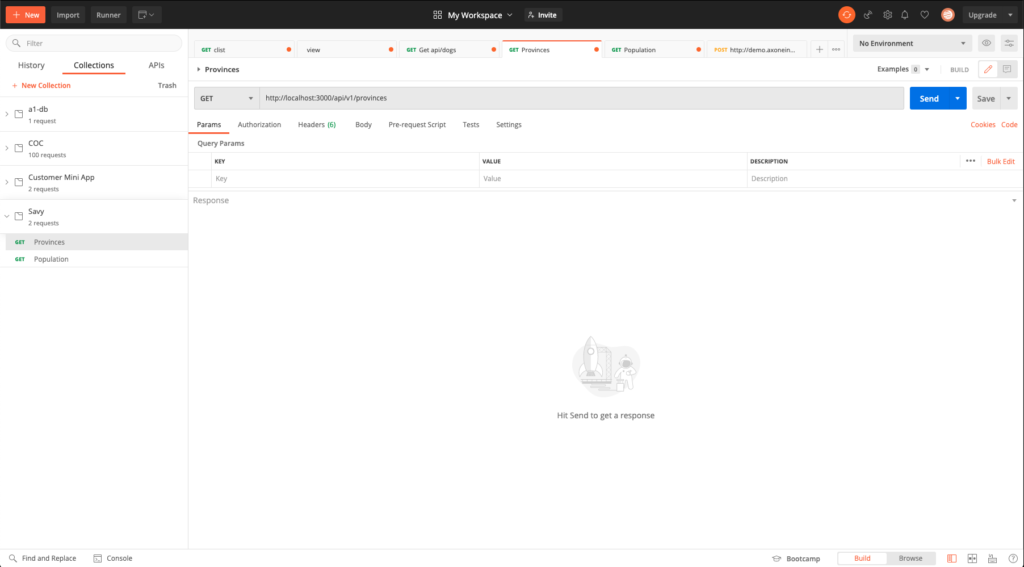
This is how your app look like and you can see the tabs on top left corner which shows History of your previous tested APIs, Collection of APIs for individual project and APIs.
On the right side, you can enter API end-URL beside GET method and you can also change Method from the dropdown list. If you want to pass parameters with the URL, you can add it in. below table that contains key, value and description of parameter. There are many other options as well related to Authorization, Headers, Body, etc… But I’ll just go through the overview of simple API testing only.
So now, once you are ready click on Send and it’ll connect and send data to your server and fetch the response from there. Response will be seen below the Query Params area. Below is the image that shows response for API: https://wmdd4992.hjvasoya.wmdd.ca/clist
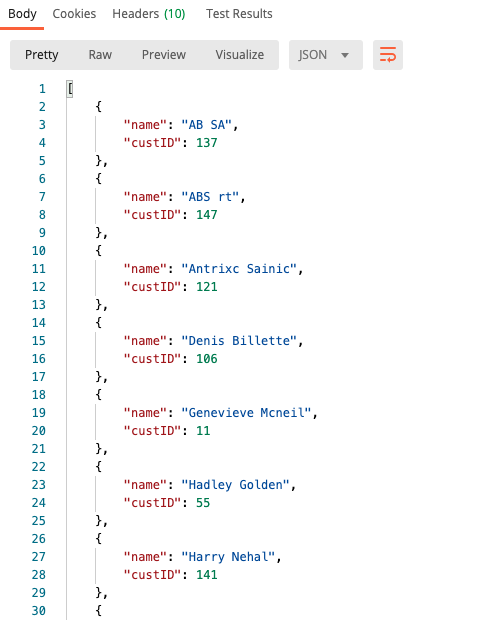
There are multiple tabs in there which shows Pretty and Raw format of response. You can also view response in HTML, XML, Text format apart from JSON Format. There are many more things that can be useful but I need to research more on it to explain but I share the link here which I referred for this information.